
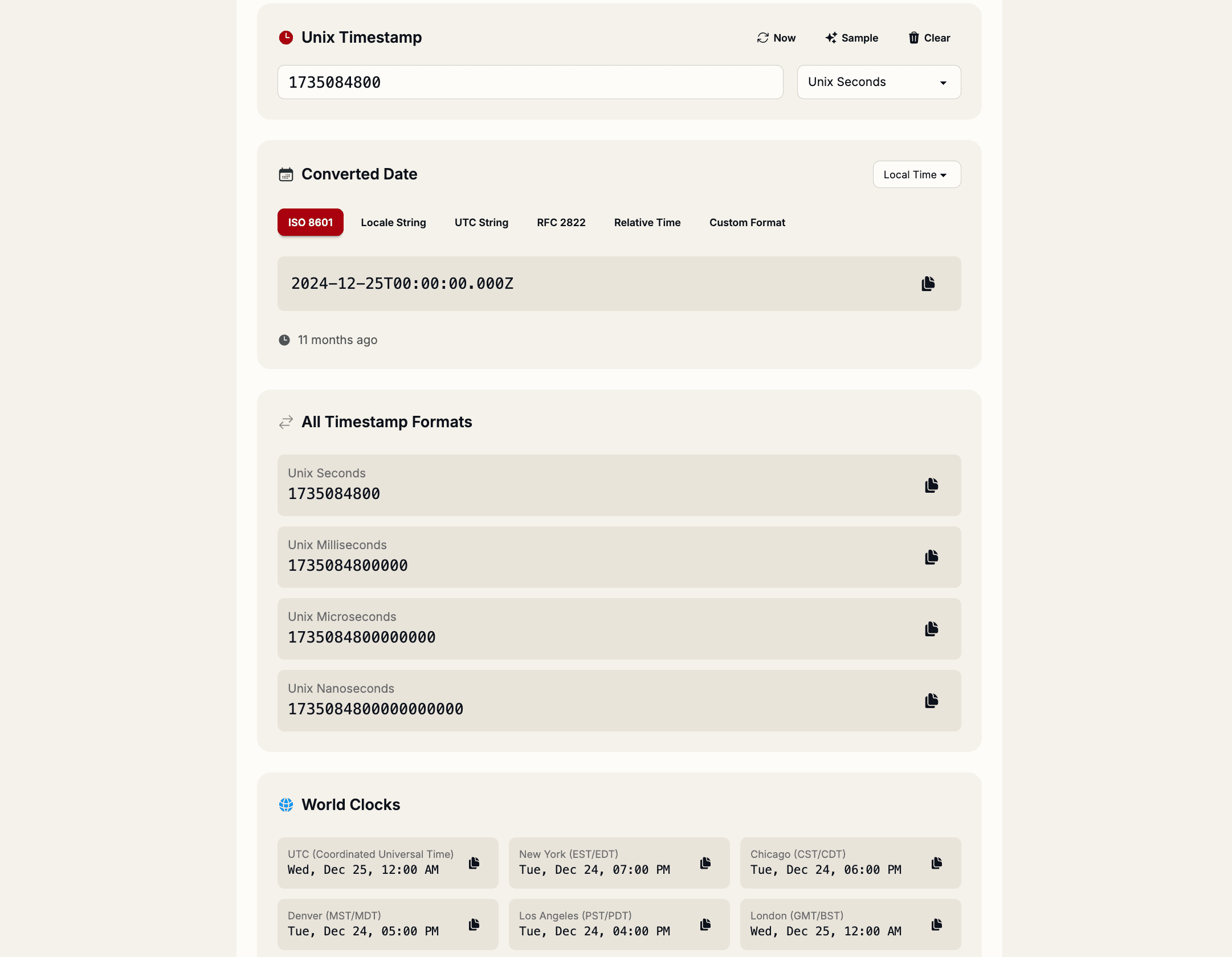
Timestamps are the silent killers of debugging sessions. That 1733011200 looks innocent until it bites you with timezone confusion or expired APIs. Day 4 of Ship Advent unlocks a converter that turns Unix timestamps into human-readable dates across timezones—instantly.
Unlock Day 4: Timestamp Converter
Ship Advent is a free developer advent calendar at shipmas-advent.com, revealing a new micro-tool each day from December 1st to 25th. Day 4 delivers a bidirectional timestamp tool at shipmas-advent.com/day/4 with no account needed.
Paste any Unix timestamp and get instant conversions to readable formats, plus timezone adjustments and relative time like "2 hours ago". Everything processes client-side for privacy and speed.
Core features that save debugging time
- Multiple precisions – Handles Unix seconds (10 digits), milliseconds (13), microseconds (16), and nanoseconds (19).
- Timezone support – Converts to UTC plus major zones like New York (EST/EDT), London (GMT/BST), Tokyo (JST), and more.
- Multiple outputs – ISO 8601, locale strings, RFC 2822, and relative time displays.
- Calendar picker – Click to select dates and see the matching timestamp.
- Auto-copy – One-click to clipboard in your preferred format.
Why timestamps trip up even senior devs
Logs show 1733011200000. Is that milliseconds or seconds? UTC or local? Expiry or creation time? One wrong assumption and your API calls fail mysteriously.
The Day 4 tool eliminates guesswork by showing all formats side-by-side, so you spot issues like off-by-one hours from timezone mismatches. No more mental math or tab-switching to converters that require accounts.
Format breakdown: Know what you are looking at
- Unix Seconds (10 digits) – 1733011200 → 2025-12-01 10:30:00 UTC.
- Milliseconds (13 digits) – 1733011200000 → Same moment, higher precision.
- Microseconds (16) and Nanoseconds (19) – For high-precision logging or databases.
Supported outputs include ISO 8601 (2025-12-01T10:30:00.000Z), relative ("in 3 days"), and locale formats.
Real-world debugging workflows
- Log analysis – Convert log timestamps to spot patterns across timezones.
- API expiry checks – Verify
expclaims from JWTs (pair with Day 3 tool). - Scheduling bugs – Debug "works on my machine" timezone issues.
- Database queries – Generate test timestamps for seeding data.
Part of the growing Ship Advent collection
Day 1: Regex Tester, Day 2: JSON Formatter, Day 3: JWT Decoder, Day 4: Timestamp Converter—and 21 more tools coming. All free, browser-based, and permanent once unlocked.
Bookmark shipmas-advent.com/day/4 for year-round use beyond December.
Convert your first timestamp
Head to the Day 4 Timestamp Converter, paste a Unix timestamp, and watch confusion turn to clarity. Perfect for logs, APIs, or any moment you need dates without the drama.
Time saved is code shipped. See you at the next Ship Advent door!