
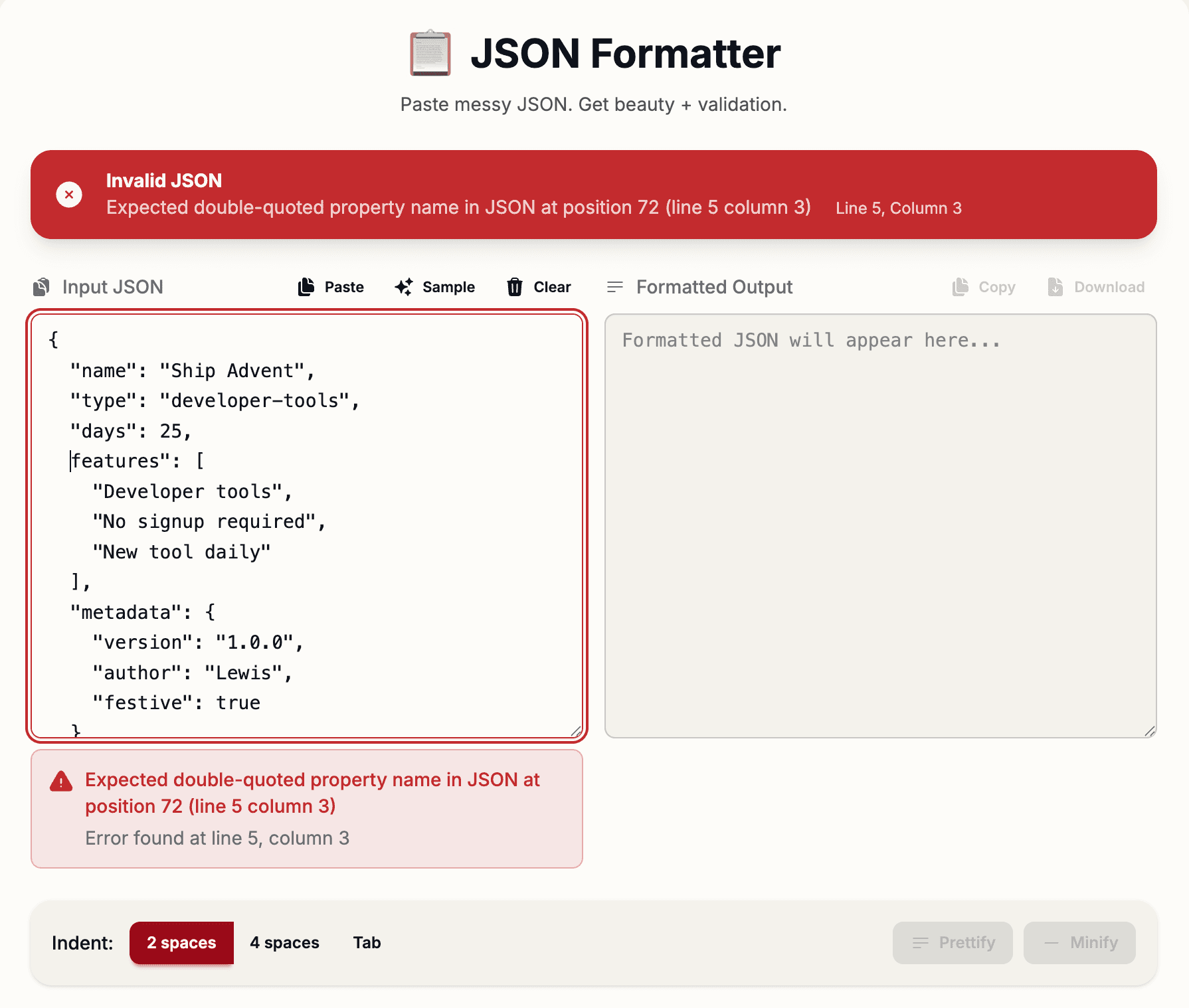
Every developer has pasted a giant blob of JSON into an editor and thought: “I just need to read this.” One line. No indentation. No structure. Just noise. Ship Advent’s JSON Formatter turns that noise into instant clarity.
Why JSON Gets So Messy
JSON is everywhere: API responses, config files, logs, webhooks, test fixtures, you name it. For machines, minified JSON is great. It’s compact and fast to transfer over the wire. For humans trying to debug a problem at 1 a.m., it’s painful.
That’s why having a fast, reliable JSON formatter in your browser is essential. No IDE plugins. No local scripts. Just paste, format, and get on with your work.
Meet Ship Advent’s JSON Formatter
Day 2 of Ship Advent unlocks a JSON formatter and validator that’s built specifically for developers who live in API land. It focuses on three things: clarity, accuracy, and speed.
Core Features
- Real-time validation — See whether your JSON is valid the moment you paste it, with friendly error messages.
- Pretty printing — Automatically formats JSON with consistent indentation so you can actually read it.
- Custom indentation — Choose between 2-space or 4-space indentation to match your project style.
- Minify mode — Collapse formatted JSON back into a compact single line for production or copy-paste into envs.
- Error highlighting — Pinpoints the exact line and column where your JSON breaks, so you know where to look.
- JSON statistics — Shows total size, key count, values, arrays, objects, and maximum nesting depth.
- One-click copy — Copy the formatted or minified output straight to your clipboard.
- 100% client-side — Your JSON never leaves your browser; everything runs locally.
How It Helps in Real Workflows
The formatter is designed around how developers actually use JSON in day-to-day work. Here are some common scenarios where it saves minutes that add up quickly.
- Debugging API responses — Paste raw responses from tools like Postman, curl, or your browser’s Network tab and see structure instantly.
- Validating config files — Double-check JSON configs before deploying to production so you don’t break a service over a missing comma.
- Cleaning minified data — Take any minified payload and turn it into readable JSON for documentation or code reviews.
- Inspecting webhook payloads — Format webhook requests from Stripe, GitHub, or custom services before writing parsing logic.
- Preparing examples for docs — Generate pretty, copy-pasteable JSON examples for API documentation pages.
Validation That Actually Tells You What’s Wrong
Many online formatters just say “Invalid JSON” and leave you guessing. Ship Advent’s JSON Formatter gives you precise feedback: the line number, column, and a human-friendly description of what went wrong.
It can detect:
- Unexpected tokens — Extra commas, stray characters, or incorrect quotes.
- Missing brackets or braces — Unclosed arrays or objects that break your structure.
- Incomplete values — Truncated numbers, strings, or booleans that never finished parsing.
Instead of scanning 200 lines manually, you jump straight to the problem area and fix it in seconds.
See Your JSON at a Glance with Statistics
When debugging complex systems, structure matters as much as content. That’s why the formatter shows quick stats about your JSON:
- Total size — How large the payload is in characters.
- Key count — How many keys exist across the whole object tree.
- Value count — How many values are stored.
- Array & object count — How many arrays and nested objects you’re dealing with.
- Maximum nesting depth — How deeply nested your structure goes, which is priceless when tracking down complexity issues.
These stats help you quickly gauge if a response is reasonable or if something went very wrong upstream.
Designed to Pair with Other Ship Advent Tools
The JSON Formatter plays especially well with other tools in the Ship Advent ecosystem. For example, responses from the Day 6 API Request Tester can be copied straight into the formatter for easier inspection and documentation.
Over time, this creates a toolkit where you can:
- Call an API with the Request Tester.
- Paste the raw JSON into the JSON Formatter.
- Clean it up, validate it, then reuse it in docs or tests.
How to Use the JSON Formatter
- Go to Ship Advent Day 2.
- Paste your JSON into the input area.
- Click Format to pretty-print or Minify to compress.
- Check the validation panel for any errors, line numbers, and explanations.
- Review the stats panel to understand the structure at a glance.
- Use one-click copy to bring the formatted or minified JSON back into your editor.
Debugging JSON shouldn ' t be the hard part of working with APIs. The hard part should be designing good systems. Formatting and validation should be one click.
Privacy by Default
Like most Ship Advent tools, the JSON Formatter is privacy-first. All parsing, validation, and formatting happens directly in your browser. Your data is not uploaded, stored, or logged on a server.
Ready to clean up your JSON? Head over to Ship Advent Day 2, paste your payload, and get instant clarity. No accounts, no setup, just fast formatting. 📋