
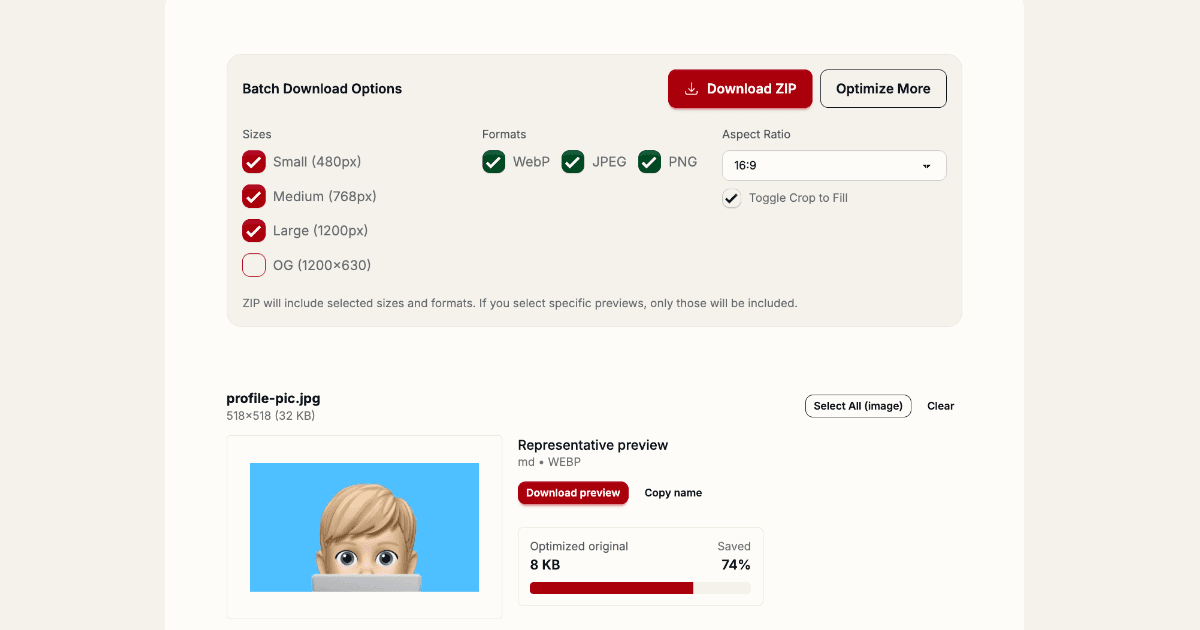
Day 18 introduces the Image Optimizer — a fast, private, client-side tool to generate production-ready responsive images in seconds.
Why this matters
Images are often the largest assets on the web. The Image Optimizer helps you ship smaller, faster pages by creating multiple sizes and modern formats (WebP, JPEG, PNG) that you can drop into your site immediately.
Key features
- 100% client-side — no uploads, no servers. Your images never leave your browser.
- Fast — immediate previews and per-variant downloads using the Canvas API.
- Responsive outputs — generates sm/md/lg sizes and srcset-ready filenames for effortless deployment.
- Aspect controls — choose to scale-to-fit with padding (letterbox/pillarbox) or crop-to-fill.
- Per-variant download or ZIP — download individual images or a single ZIP with all selected variants.
- OG preview — preview social share images (OG) and download optimized OG cards.
How to use
- Open /day/18 and drop your images into the upload area.
- Select breakpoints (sm/md/lg) and formats you want to generate.
- Pick the aspect behavior: scale-to-fit (padding) or crop-to-fill for tight aspect ratios.
- Inspect the representative preview, then download individual variants or a ZIP of all selected images.
Privacy & performance
Because all processing runs in your browser, the Image Optimizer is private and works offline as well. It uses the HTML Canvas API for speedy processing and never sends image data to our servers.
Optimize images quickly — keep them private and ship faster. 🚀🖼️